Getting Started
Before doing anything, you should install the dependencies, compile the program and verify that everything works as expected.
Dependencies
Qt5 framework for C++11
make (build tool)
dxflib (library for reading/writing DXF files)
- For common environments:
On Arch Linux run (TODO)
sudo pacman -S base-devel qt5-tools
On Ubuntu run (TODO) ...
Documentation
Directory Structure
Here is the top level directory structure of the project, including some of the most important files.
schim/
├── docs/               # Source files for the user documentation
├── misc/               # Miscellaneous stuff
├── pkg/                # Packaging for distribution
├── res/                # Resources
├── scripts/            # Various helper scripts
├── src/                # The source code
├── tests/              # Tests and automation
└── Makefile             # The main Makefile
To get more information about each directory, look for a README.md inside that directory. Note that not every directory has a README.
Conceptual Structure
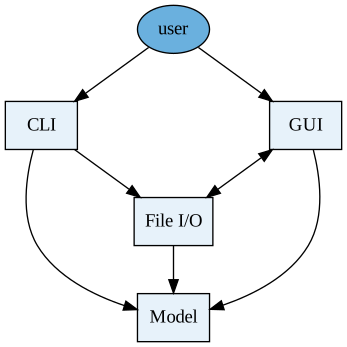
Note: An arrow from object A to B means that A depends on B or A can
access B.
The project is divided into four conceptual groups, which are meant to be as decoupled as possible:
The model contains a representation of a project and all its components that is
independent of the format it is accessed in. Model classes are located in files
within the src/model/ directory. The model must know nothing about the other
groups.
The graphical user interface contains everything that is related to
representing a project to the user in the graphical editor. As such, it needs to
have knowledge of the model. It must not know about the command line
interface. GUI classes are located in the src/ui/ directory.
File input/output is used to generate files from models or generate models by
reading files. It must know about the model and GUI, but not about the CLI.
Ideally, it wouldn't need to know about the GUI either, but we use Qt's built-in
functionality to export graphical objects into some file formats. File I/O
classes are located in the src/fileio/ directory.
The command line interface provides an interface for quick operations on a
project from a terminal, without the need to open the full GUI application. It
must know only about the model and file I/O. CLI classes are located in the
src/cli/ directory.
Motivation
The motivation for the above conceptual structure can best be explained by a common use case.
Projects, components and other defined symbols are kept in files. To read from these files, we make use of the File I/O module. Thus, we convert these files into a Model represented by C++ objects.
Schim will most commonly be used to create and edit schematics via its graphical editor. When the user opens a project in the editor, the model is loaded first. When the user opens a sheet for editing, GUI objects are created that wrap the model. Any changes that the user makes in the editor are (usually) applied to the GUI representation and the model at the same time.
When it's time to save changes to a file, the File I/O module is invoked again. If the schematic is to be exported to a different type, file I/O sometimes uses the GUI objects' built-in API (provided by Qt) to convert the schematic. This is the sole reason why the file I/O module is aware of the GUI module.
Schim also has a rich command line interface to automate common tasks and avoid opening the GUI unneccessarily. Many of these operations involve direct manipulation of files, so File I/O is a dependency of CLI.
Nudging you in the right direction
Here are some good starting points, depending on what you want to do.
Adding user actions
Adding a configuration option
Adding and modifying dialogs
This is probably the task with the slightest learning curve. You do not need to have any deep knowledge of the internals of the app, and most of the development here is visual by nature.