Qt provides QGraphicsView and QGraphicsScene to visually represent QGraphicsItem-s. You should have at least a basic knowledge of these classes if you wish to develop the GUI. We have created custom subclasses of these classes. A sheet is represented by a SheetView and SheetScene, and an object is represented by a GObject.
Note
The base classes are also used on their own in some places.
SheetView
Defined in src/ui/sheetview.h
This is a widget that displays a schematic to the user. It cooperates with SheetScene to display and interact with graphical objects.
Rubber band selection
Schim supports two types of rubber band selection. If the user initially drags the rubber band to the right, objects are selected only if they are wholly contained in the band. On the other hand, if the user initially drags the band to the left, any objects that are touched by the band are selected. Here's a coarse overview of what happens in the program.
mousePressEventreceives a left click and memorizes the positionSubsequent calls of
mouseMoveEventtry to determine whether dragging is to the left or to the right by callingprocessRubberBandDrag.mouseReleaseEventdisables the state of dragging.
SheetScene
Defined in src/ui/sheetscene.h
Scene operations
Defined in src/ui/operations.h
Many user actions are composed of multiple steps. For example inserting a line
requires the insertion of two points in succession. For this functionality, we
have created the class SceneOperation.
To start an operation, construct it and call SheetScene::startOperation. The
operation will receive and process any applicable events. Once the operation
finishes, it will emit the SceneOperation::finished signal. The scene will
pick up on this signal.
-
class
SceneOperation: public QObject Subclassed by OpInsertComponent, OpInsertLine, OpInsertRect, OpInsertText
Public Functions
-
explicit
SceneOperation(SheetScene *scene)
-
virtual void
mousePressEvent(QGraphicsSceneMouseEvent *event)
-
virtual void
mouseMoveEvent(QGraphicsSceneMouseEvent *event)
-
virtual void
mouseReleaseEvent(QGraphicsSceneMouseEvent *event)
-
virtual void
keyPressEvent(QKeyEvent *event)
-
virtual void
cancel()
Signals
-
void
finished()
-
explicit
-
class
SceneOperation: public QObject The base class of all scene operations.
An operation is any multi-step process that relies on mouse/keyboard input. An example of an operation is inserting a line.
Each operation is associated with a scene.
Subclassed by OpInsertComponent, OpInsertLine, OpInsertRect, OpInsertText
Public Functions
-
explicit
SceneOperation(SheetScene *scene) Construct a scene operation in the specified scene.
-
virtual void
mousePressEvent(QGraphicsSceneMouseEvent *event) Process a mousePressEvent. The base implementation does nothing.
-
virtual void
mouseMoveEvent(QGraphicsSceneMouseEvent *event) Process a mouseMoveEvent. The base implementation does nothing.
-
virtual void
mouseReleaseEvent(QGraphicsSceneMouseEvent *event) Process a mouseReleaseEvent. The base implementation does nothing.
-
virtual void
keyPressEvent(QKeyEvent *event) Process a keyPressEvent. The base implementation does nothing.
-
virtual void
cancel() Cancel the operation.
This will delete any dangling objects and remove them from the scene. The
finishedsignal will be emitted.
Signals
-
void
finished() Emitted when the operation has finished, either successfully or not.
-
explicit
The following operations are currently defined:
Snap feature
The snap-to-grid feature is enabled/disabled by calling
SheetScene::setSnapEnabled.
Scene vs view
Sometimes it may seem arbitrary whether to implement a feature in the view or in the scene. Sometimes it is. But as a rule of thumb:
Implement a feature in the scene if:
it changes the structure of the sheet
objects need to be aware of the feature and/or react to it
Implement a feature in the view if:
it doesn't change the structure of the sheet (e.g. zooming, panning)
it requires access to the global coordinate system (an exception would be if the global position can be obtained from a mouse event)
it needs to display items that are transform-invariant
multiple views containing the same scene can use the feature at the same time
The general idea is to let the scene know as little as possible about the view. This is because multiple views can be used to display the same scene at the same time. If the scene (or an object by calling a scene function) needs to communicate with a view, use signals and slots. This way, only interested views can pick up on that.
GObject
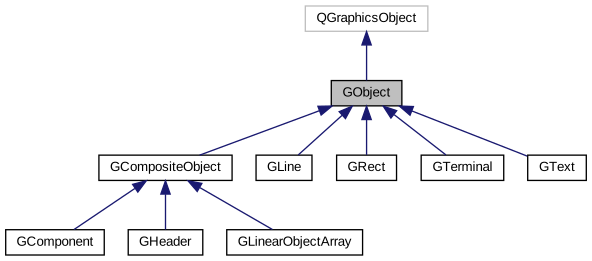
Inheritance graph
Collaboration graph
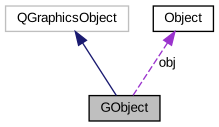
An object is visually represented as a GObject, which is a wrapper around an Object. Derived classes follow the same naming convention. Namely, the graphical class is named by prepending the corresponding model class name with the letter 'G' (for graphical). For example, a Line is wrapped by GLine.
To construct a GObject to wrap an Object obj call
GObject::assign(obj).
The following classes are derived from GObject:
-
class
GObject: public QGraphicsObject Subclassed by GCompositeObject, GLine, GRect, GTerminal, GText
Public Functions
-
explicit
GObject(Object *obj)
-
virtual
~GObject()
-
virtual Object *
get()
-
bool
isHovered() const
-
virtual void
setCosmetic(bool cosmetic)
-
virtual void
reloadFromModel()
-
virtual void
applyToModel()
-
virtual void
showHandles(bool show = true)
-
virtual void
handleChanged(GObjectHandle *handle)
-
void
hoverEnterEvent(QGraphicsSceneHoverEvent *event) override
-
void
hoverLeaveEvent(QGraphicsSceneHoverEvent *event) override
-
QRectF
boundingRect() const override
-
void
paint(QPainter*, const QStyleOptionGraphicsItem*, QWidget*) override
-
GCompositeObject *
parentItem() const
-
explicit
-
class
GObject: public QGraphicsObject The base class of all objects represented in a graphical scene.
This class is conceptually an abstract one - it shouldn't be used on its own.
Subclassed by GCompositeObject, GLine, GRect, GTerminal, GText
Public Functions
-
explicit
GObject(Object *obj) Construct a wrapper around
obj.The object is movable, selectable and sends geometry changes by default. Hover events are accepted.
-
virtual
~GObject() Destroy any handles that are still active.
-
virtual Object *
get() Return the object that is being wrapped by this class.
Note
Derived classes should change the return type of this method to match the type of the object that is wrapped by them.
-
virtual const Object *
get() const
-
Entity *
getModelParent() const
-
bool
isHovered() const Return whether the mouse is over this object.
-
GObject *
getOldestParent()
-
SheetScene *
getSheetScene() const
-
virtual void
setCosmetic(bool cosmetic) Make the object's pen independent of any transformations.
Make an object cosmetic when it is going to be rendered to an icon.
-
virtual void
reloadFromModel() Update the graphical representation to match the object from the model.
Note
The base implementation does nothing and should be implemented in derived classes.
-
virtual void
applyToModel() Apply changes to the underlying model object.
Note
The base implementation does nothing and should be implemented in derived classes.
-
virtual void
showHandles(bool show = true) Display/hide the handles for this item.
The list of handles is dynamically allocated and it exists only while the handles are visible. This way, the handles do not take up memory when they are not used.
Note
The base version of this method implements only the deletion of handles, i.e. when
show = true. Each subclass should implement this this method separately, optionally calling the superclass method but only as the last statement.
-
virtual void
handleChanged(GObjectHandle *handle) Called when a handle's position has changed.
The base implementation does nothing.
- Parameters
handle -- The handle that has been modified.
-
void
hoverEnterEvent(QGraphicsSceneHoverEvent *event) override Set
hovered=trueso that it can be used by paint.
-
void
hoverLeaveEvent(QGraphicsSceneHoverEvent *event) override Disable the bool
hoveredso that it can be used by paint.
-
QRectF
boundingRect() const override Default implementation that returns childrenBoundingRect().
-
void
paint(QPainter*, const QStyleOptionGraphicsItem*, QWidget*) override This implementation applies aesthetic modifications when the object is hovered or selected.
Note
Derived classes should call this version at the beginning of their implementation to apply the aesthetic changes.
-
GCompositeObject *
parentItem() const Return the parent item cast to a
GObject*.
-
explicit